How can I delay the launch of my second autorun file?
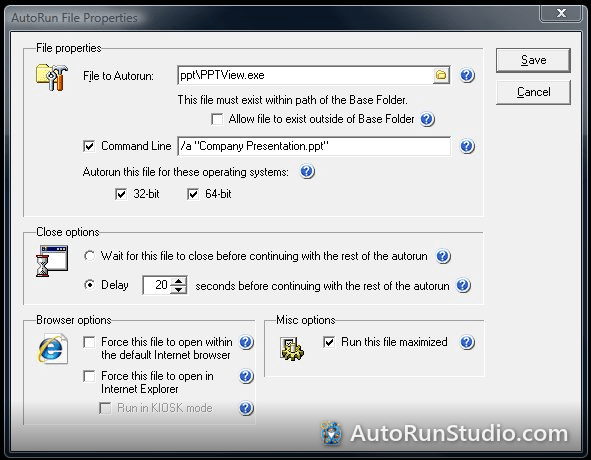
With AutoRun Wizard you can easily delay the launch of your 2nd autorun file or have your 2nd autorun file wait until after your first autorun file is completed. Your options exist on the AutoRun File Properties window. From here you can select your options.
For the first autorun file select the Close option that meets your needs:
Wait for this autorun file to close before continuing on with the rest of the autorun. This means AutoRun Wizard will wait for the first autorun file to close before running your 2nd autorun file.
Delay X seconds before continuing with the rest of the autorun. This means AutoRun Wizard will delay X for this autorun file to close before continuing on with the rest of the autorun.
For the first autorun file select the Close option that meets your needs:
Wait for this autorun file to close before continuing on with the rest of the autorun. This means AutoRun Wizard will wait for the first autorun file to close before running your 2nd autorun file.
Delay X seconds before continuing with the rest of the autorun. This means AutoRun Wizard will delay X for this autorun file to close before continuing on with the rest of the autorun.
Try it yourself. AutoRun Studio is free to download and fully functional - see how it handles this on your own USB drive or CD.
Download & Try Free