How can I autorun a file, then Explorer to my CD?
If all you want is to open Windows Explorer at the root of your CD, choose that option on the Auto Launch tab:
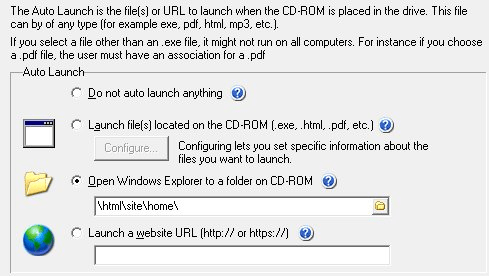
To run one or more files first and then open Windows Explorer, add Explorer as your last autorun file (you can configure up to 5):
- Configure the file(s) you want to run first, then choose the next file.
- In the AutoRun File Properties, type
explorerin File To Autorun. - Check Allow file to exist outside of Base Folder.
- Check Command Line.
- Enter
%BASE_FOLDER%to open the root of the disc. To open a folder on the disc, add its name with no backslash in between, for example%BASE_FOLDER%contents. - Click Save, then Test.
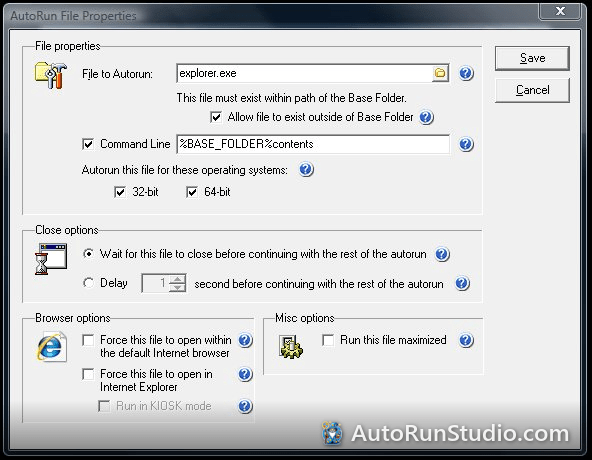
To open Explorer only after the user closes the first file, set that file's close option to Wait for this autorun file to close. See delaying the second autorun file.
Try it yourself. AutoRun Studio is free to download and fully functional - see how it handles this on your own USB drive or CD.
Download & Try Free