Everything works fine when I Test the CD using AutoRun Wizard, but when I burn to CD it doesn't autorun?
If the Test button works, your AutoRun Wizard project is configured correctly. Whether a burned disc starts by itself is decided by Windows, not by AutoRun Wizard: AutoRun Wizard creates the files Windows looks for (autorun.inf, autorun.exe and autorun.dat), and Windows decides what to do with them.
On Windows 10 and 11 a CD never starts silently. Windows shows an AutoPlay notification and the user clicks Run autorun.exe. That is normal. The full walkthrough, with pictures, is in My AutoRun CD does not launch on Windows 10 or 11.
The one test that matters
Open File Explorer, click This PC, and double-click the CD drive. If your project starts, the disc is built correctly and any remaining behavior is a Windows setting on that PC. If it does not start, work through the list below.
Common causes
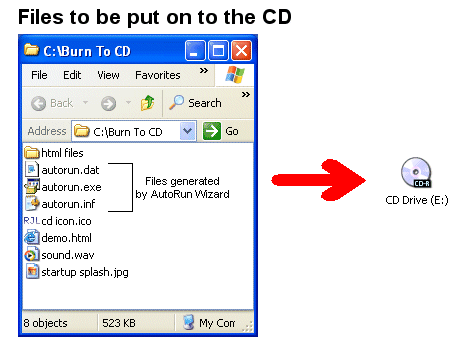
- The Base Folder itself was burned. Burn the contents of the Base Folder, not the folder. These files must be at the root of the disc (for example
D:\autorun.inf):- autorun.inf
- autorun.exe
- autorun.dat
- The burning software still has the drive locked. Right after burning, Windows may not read the new disc. Eject and reinsert it, try it in another computer, or restart.
- The disc was burned as a "USB flash drive" (Live File System) disc. Burn a mastered data disc ("With a CD/DVD player" in File Explorer) and finalize it.
- AutoPlay is turned off on that PC, or a default such as "Take no action" was chosen for discs. See how to check AutoPlay.
- The PC is managed by an employer or school that turns AutoPlay off. Only their IT department can change that.
Check the autorun.inf file
- Right-click the CD drive and choose Open.
- Open autorun.inf in Notepad.
- The line beginning with
open=should sayautorun.exe, and autorun.exe must be in the same place as autorun.inf.
If that is all correct, your AutoRun Wizard configuration is right and Windows on that PC is choosing not to start it. Test on a second computer to confirm. What is in an autorun.inf file?