How do I AutoRun an HTML file?
You can autorun any file with AutoRun Wizard, and an HTML page is one of the most popular choices because it can act as a menu for everything on your CD or USB drive.
- Copy your HTML file (and its images, CSS and other pages) into the Base Folder.
- On the Auto Launch tab choose Launch File(s) and click Configure.
- Check First file to autorun, click the [...] button, then use the small folder icon next to File to Autorun to select your HTML file.
- Under the Misc options, check Force the file to be opened within the default Internet Browser.
- Save, then click Test.
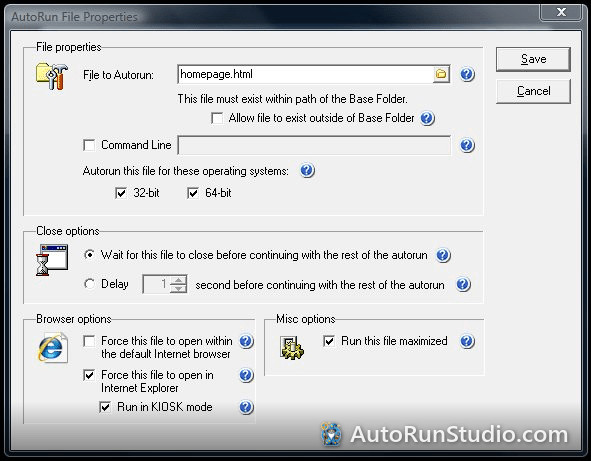
Why force the default browser?
Without it, Windows opens the file with whatever program is associated with .html on that PC. On some PCs that is an HTML editor rather than a browser. Forcing the default browser makes sure your page opens in Edge, Chrome or Firefox, whichever the user prefers.
What about Internet Explorer and Kiosk mode?
The Internet Explorer and Kiosk options were built for older Windows. Internet Explorer is retired on Windows 10 and was never part of Windows 11, so on those PCs your page opens in Microsoft Edge without Kiosk mode. For a full-screen menu on modern Windows, see opening your menu full screen in Microsoft Edge.
Tips for HTML on a disc
- Use relative links (
products.html,images/logo.png), never drive letters, so the page works whatever letter the drive gets. - Keep everything on the disc. A page that loads fonts or scripts from the internet looks broken on a PC that is offline.
- On Windows 10 and 11 the user clicks the AutoPlay prompt to start a CD, and a USB drive never starts by itself. See Windows 10 and 11 behavior.
Try it yourself. AutoRun Studio is free to download and fully functional - see how it handles this on your own USB drive or CD.
Download & Try Free