When I autorun my HTML, why is Internet Explorer is giving me a warning about blocking content?
This warning comes from Internet Explorer, which is retired on Windows 10 and 11. Modern browsers such as Microsoft Edge, Chrome and Firefox do not show it for pages opened from a CD or USB drive. If your project forces Internet Explorer, switch it to Force the file to be opened within the default Internet Browser; see How do I AutoRun an HTML file?
On older Windows with Internet Explorer, opening an HTML page that contains scripts from a CD or the local disk shows this message:
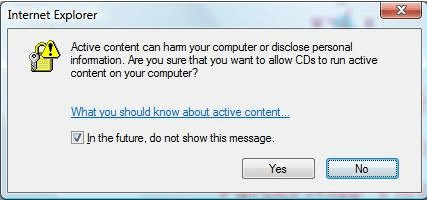
It comes from Internet Explorer's security settings, not from AutoRun Wizard. You see the same message if you open the page with File > Open in Internet Explorer.
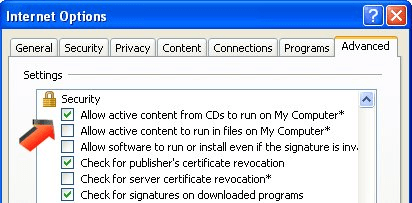
To stop it on a PC you manage, in Internet Explorer choose Tools > Internet Options > Advanced, scroll to Security, and check "Allow active content from CDs to run on My Computer" and "Allow active content to run in files on My Computer." Click OK and restart Internet Explorer.
Pages in modern browsers
Modern browsers open local pages without this warning, but they do limit some scripts on pages opened from a disc (file:// pages). Simple navigation, images, CSS, video and most JavaScript work; code that loads other files with fetch or XMLHttpRequest usually does not. Keep your menu to plain links and it works everywhere.