Can I force my autorun to open in Internet Explorer?
Microsoft has retired Internet Explorer. It is permanently disabled on Windows 10 and was never part of Windows 11. On those PCs, a request to open Internet Explorer opens Microsoft Edge instead, and the Kiosk setting is not applied. For new projects, use the default browser option or Edge kiosk mode: How do I open my HTML autorun menu full screen in Microsoft Edge?
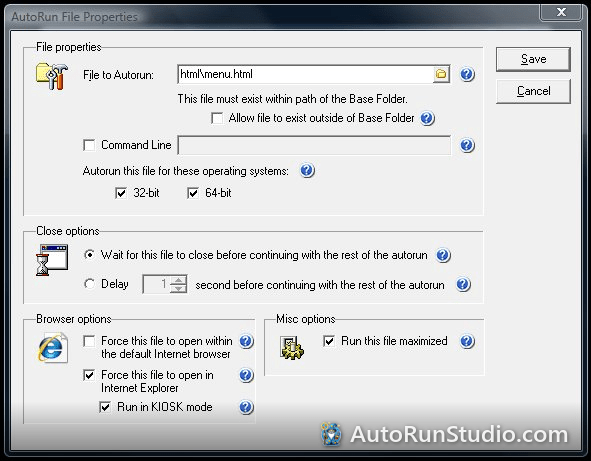
AutoRun Wizard's File Properties have two browser options:
- Force the file to be opened within the default Internet Browser - recommended. Opens your HTML (or PDF) in whatever browser the user prefers.
- Force the file to be opened within Microsoft Internet Explorer, with an optional Kiosk mode. On Windows 8.1 and older, Kiosk mode ran Internet Explorer full screen with no title bar, menus, toolbars or status bar. The user closed it with Alt+F4 or a close link in your page.
A close link for the page is described in How can I close the KIOSK window?
Try it yourself. AutoRun Studio is free to download and fully functional - see how it handles this on your own USB drive or CD.
Download & Try Free